
Dip Risej · Deep Research3 min read
Research with sources
Explore a question in depth and receive a report with links you can check.
Use it for
- Compare options for a small business
- Research a topic for school or work
- Find background for a proposal
Inside the app Enlarge
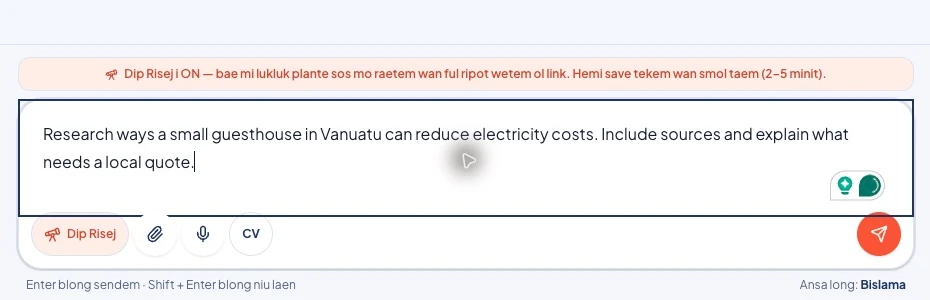
- 1Deep Research: turn on before sending
- 2Prompt: define scope and location
- 3Source links: open and verify
How to use it
- 1
Set the question
Open Chat and turn on Deep Research. Specify the topic, country, timeframe and the decision you are trying to make.
- 2
Request evidence
Ask for source links, publication dates and any gaps in the evidence. Send the request and allow extra time for research.
- 3
Read the report
Review the findings and follow the cited links. Distinguish facts from estimates and recommendations.
- 4
Refine or export
Ask a focused follow-up or use the document controls to keep a report. Turn Deep Research off for a simple writing task.
Try a request like this
“Research practical ways a small island guesthouse can reduce electricity costs. Prioritise sources relevant to Vanuatu, link them and state what needs a local quotation.”
Adapt the names, dates and details before sending. Example requests do not run automatically.
Good to know
- Research can take several minutes and is subject to your allowance.
- Source links are starting points: verify critical claims on the original page.
- Research does not make bookings, submit applications or purchase services for you.